
College Students Ditching Bulky Laptop Bricks TESSAN 65W Desk Strip Fall 2026
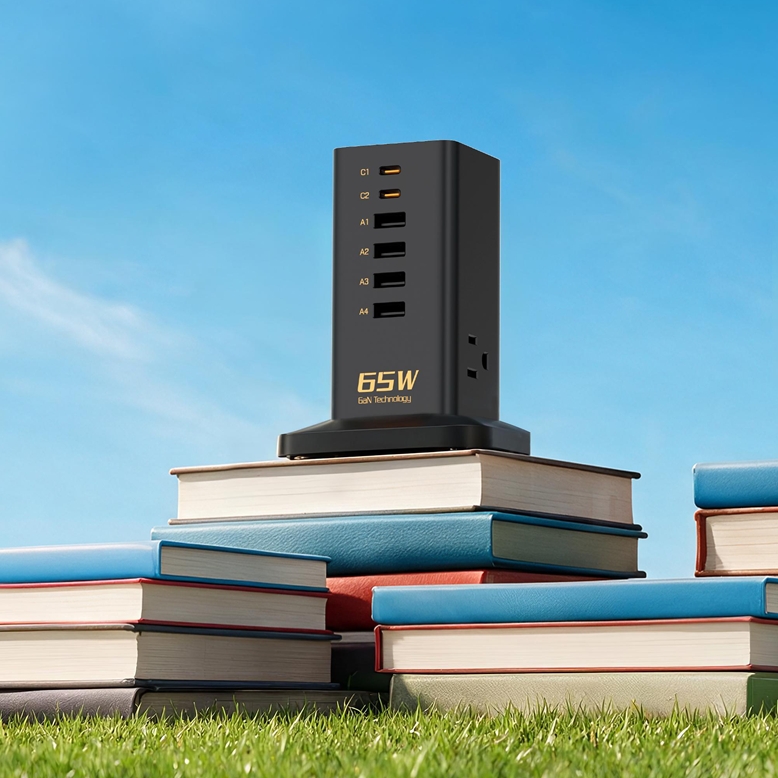
New York, United States – August 19, 2026 – New semester, new schedule, new rooms, and the same tangle of chargers you meant to sort out last year. A normal day runs a laptop through lectures, a phone all day, earbuds on the walk over, and a tablet for reading and assignments. Keeping all of it charged sounds trivial until you’re in a dorm room with one reachable outlet and a desk that’s already full.
The TESSAN 65W Desk Power Strip is built for that setup. It puts AC outlets and USB charging into one desktop unit instead of three separate bricks fighting over the same socket. If your charging corner is currently a pile, it’s worth a look.
What Is the TESSAN 65W Desk Power Strip?
Part power strip, part charging station. Three AC outlets, four USB-A ports and two USB-C ports, so several things can be connected at once.
The 65W figure is the part that matters for current student gear. Compatible USB-C devices, including laptops, tablets and phones, can charge faster from this than from a basic USB power source. GaN technology keeps the charging hardware fairly compact while still supporting that higher output.
It also isn’t built to hang off a wall socket. It sits on the desk, which sounds minor and isn’t, especially during a long working stretch when you need several connections within reach.
Why Desk Space Matters in Student Life
Student desks fill up fast. Books, notebooks, stationery, laptop, headphones, water bottle, and then a handful of charging adapters competing for whatever surface is left.
One station pulls those connections into a single spot. The right-angle design helps with cable routing too, particularly when the unit sits against a wall or at the back of the desk.
The 5-foot extension cord does quiet work here. You aren’t stuck placing the station right beside the wall outlet, which matters when the furniture happens to be parked in front of the only socket in the room.
Handling a Typical Academic Day
Morning: phone gets checked while you’re heading out for an early lecture. Midday: laptop for notes or coursework. Afternoon: tablet for reading. Evening: wireless accessories need topping up before a study session.
Having all of that available in one place is what makes the routine less annoying. The three AC outlets take conventional plugs, and the USB-A and USB-C ports handle direct charging for compatible devices.
Maximum speed on every device isn’t really the point. Fewer separate charging accessories cluttering the desk is.
65W Charging and GaN Technology
The 65W output is the headline spec. On compatible USB-C equipment, more power means less time waiting for a battery to fill than you’d spend on a low-power source. Real speeds still depend on the device, the charging protocol, the cable, and how power gets divided when several things are plugged in at once.
GaN, or gallium nitride, is the other one worth knowing about. GaN components handle power conversion efficiently in a small form factor, which counts if you’re carrying your charging gear between a dorm, a classroom, the library and a workplace.
One caution. A 65W rating is the station’s ceiling, not a promise made to every port. No connected device is automatically getting 65W because the label says so.
Useful Beyond the Dorm Room
Student housing is the obvious setting, but the same logic travels. A business-related course, a conference, a cruise: all of them involve charging several devices without hauling a bag of separate adapters.
Its portable design moves between locations more easily than a full-size power strip. Just check the electrical rules and outlet requirements wherever you’re going, particularly for international travel or unfamiliar power systems.
Safety and Summer Charging Considerations
Charging several devices at once earns electrical safety a paragraph of its own. Don’t exceed the power rating of the connected equipment, and look over cables and plugs now and then for visible damage.
Heat is the summer version of the problem. Charging electronics shouldn’t be buried under clothing, bedding or anything else that traps heat. Keep the station on a clear, stable desk surface, especially during long study sessions.
A charging station should make things convenient without tempting you into overloading it. Follow the manufacturer’s electrical specifications and whatever your individual devices require.
Is It Practical for the Smart-Charged Semester?
Think of it as a central charging point rather than another extension cord. Three AC outlets, four USB-A ports, two USB-C ports, 65W of charging capacity, GaN internals, a right-angle design and a 5-foot extension cord: between them they cover most of what makes a student workspace chaotic.
A semester built around laptops, phones, tablets, online classes and constant communication runs better when power is organized and reachable. Consolidation is probably the most valuable thing on offer here, more than any single spec.
So for Smart-Charged Semester 2026, the question isn’t whether every device needs maximum charging speed. It’s whether your charging setup keeps up with everything you plug in while leaving desk space to actually work. A multi-port desktop station does that well, as long as its capacity and safety guidelines match what you’re genuinely charging.
About:
TESSAN is a consumer electronics brand offering charging solutions and power accessories designed for modern homes, offices, travel, and student workspaces. Its product range focuses on practical, compact, and efficient power solutions for keeping multiple devices connected and charged.
Media Contact
Company Name: Tessan Power
Contact Person: TESSAN Communications Team
Email: Send Email
Phone: +1 833-362-9899
Country: United States
Website: www.tessan.com


